C1 Themes, UI kits, dark mode
A GoHighLevel white label theme in your clinic colours
27 complete themes and 11 UI kits that restyle every GoHighLevel screen your team touches, light or dark. Pick, preview, save: the app stops looking like software and starts looking like your practice.
- Every theme in every plan
- Dark mode included
- One line to install
Try a theme, a UI kit and dark mode
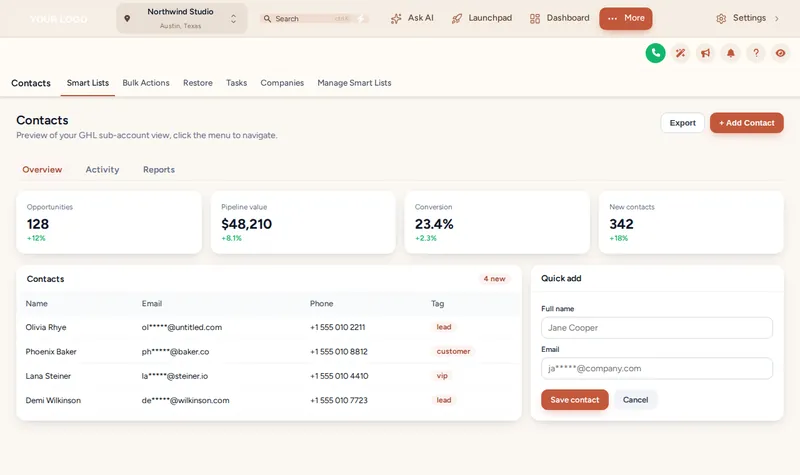
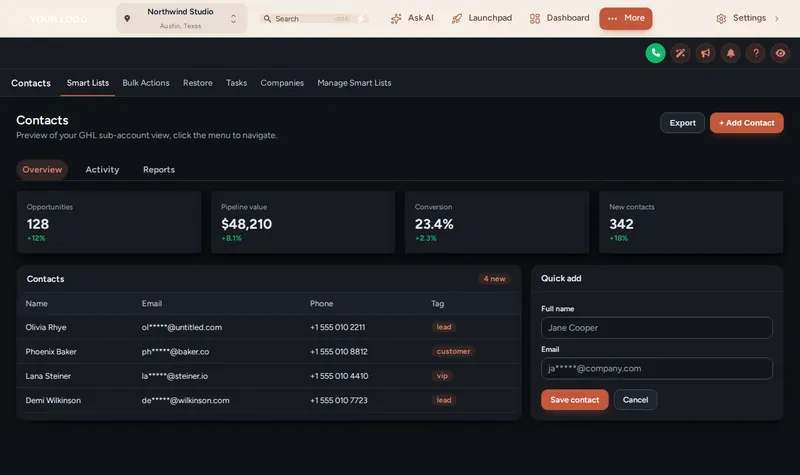
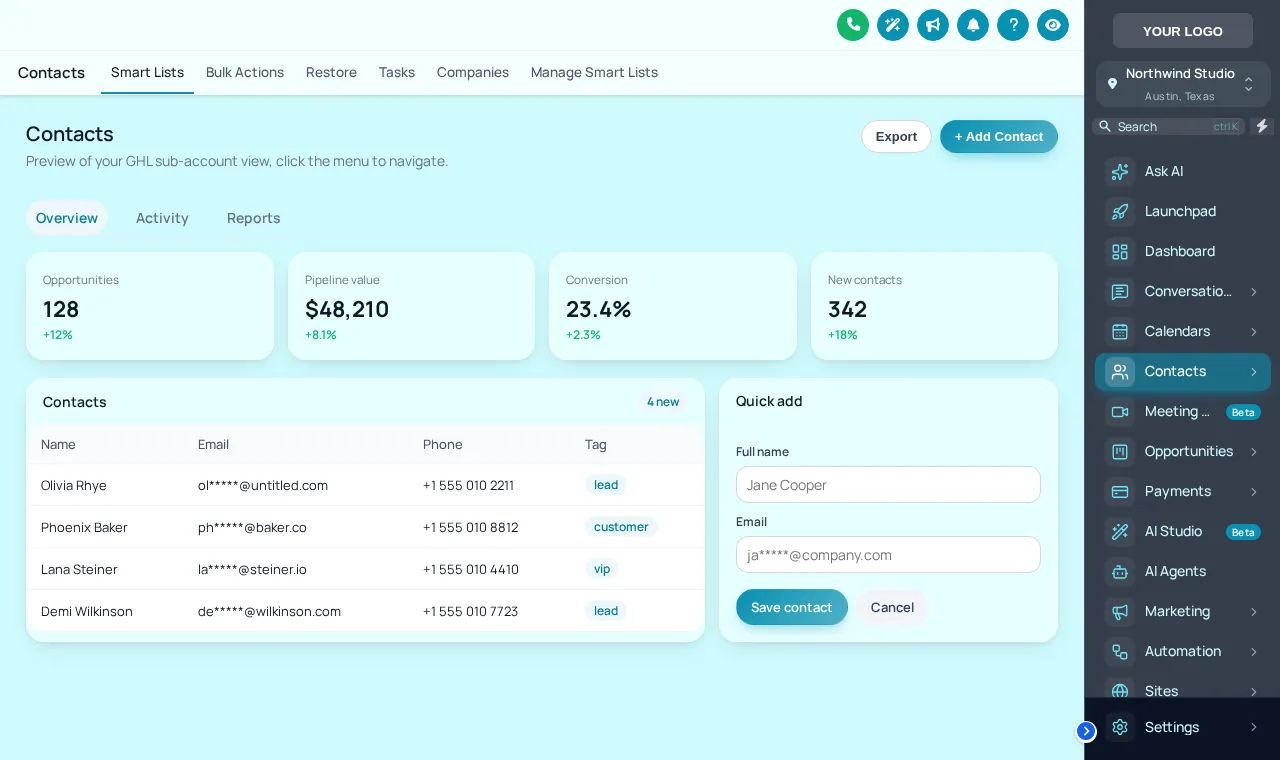
A GoHighLevel white label theme changes the whole app's look without changing how it works. Below, the real engine restyles a sample account: choose a theme, layer a UI kit on top, then switch the contacts screen to dark mode.
Loading the live preview
Desert SandThe real theme engine restyling a copy of GoHighLevel. Pick a theme, lay a UI kit over it, then flip to dark mode on the contacts page.
27 Themes in the gallery
Every theme, with its two defining colours
Left half: the sidebar or top bar. Right half: the accent used on buttons and highlights. All of them can be recoloured to your brand.
- Midnight EmberDark navy sidebar, orange energy
- Arctic CleanWhite top bar, crisp blue SaaS look
- Ocean GlassFrosted glass over an ocean photo, right dock
- Forest FinanceDeep green, side accents, calm & trustworthy
- Neon NightsPurple-to-pink glow, bold and modern
- Mono StudioBlack & white brutalist, top bar
- Sunset CoralWarm peach sidebar, round & friendly
- Royal Navy & GoldPremium navy with gold highlights
- Lavender DreamPastel lilac, soft & airy
- Slate CorporateNeutral slate & indigo, compact & efficient
- AuroraGlass sidebar over a northern-lights photo
- Desert SandEarthy beige & terracotta, top bar
- Midnight SkyDeep violet night, twinkling stars on the login
- Editorial StudioCrisp black & teal, magazine-style login
- Cinematic CityAmber city lights, full-screen photo login
- Care DeskFriendly support blue, split photo login
- Prism ProDark indigo with a colour-ring login
- Pastel MeshSoft light theme, morphing colour login
- Alpine GlassFrosted glass over misty mountains
- Creative AgencyCrisp white & rose, top bar, photo-wall login
- Golden HourWarm peach & amber, sunrise-hills login
- Deep SpaceMidnight blue & cyan, orbiting-planets login
- Cyber LimeNear-black with electric lime, light-beam login
- Holo PearlPearl white with pink-violet foil, holographic login
- Graphite ProDark mode , soft graphite with an indigo glow
- Obsidian OLEDDark mode , true black with a vivid raspberry glow
- Midnight MintDark mode , deep navy with fresh mint accents
11 UI kits decide how the screens feel
A theme sets colour. A UI kit sets texture: how much shadow a card casts, whether buttons are pills or squares, whether panels look like glass. Mixing the two gives you far more than 27 looks.
- Soft Shadow
- Bordered Flat
- Elevated
- Glass
- Accent Top
- Side Accent
- Brutalist
- Studio Gradient
- Halo Glow
- Crisp Highlight
- Rounded Pill
Why a branded CRM matters in a clinic
A chiropractic front desk lives in GoHighLevel: confirming adjustments, answering texts, moving new patients through intake. When the app looks like the clinic, staff and associate doctors treat it as the clinic's own system rather than one more tool.
Pairs well with
Most clinics match the theme to a branded login page in the same plan, then reorganise the menus and the dashboard once the look is settled.
How to restyle GoHighLevel with a theme
Start from a theme
Open the theme gallery and pick one of the 27 designs. The live preview restyles a sample account the moment you click.
Lay a UI kit over it
Choose one of the 11 UI kits to set how cards, buttons, tables and inputs feel: soft shadows, flat borders, glass, pill shapes and more.
Add your clinic colours and logo
Swap in your logo and brand colours. Every screen, from contacts to settings, follows the new palette.
Decide on dark mode and layout
Keep it light, offer dark mode, and choose a left sidebar, a right dock or a top bar.
Save and it goes live
Once the one-line install is in place (about 2 minutes, done once), every save shows up in GoHighLevel on its own.
Theme and dark mode questions
What is a GoHighLevel white label theme?
It is a complete restyle of the GoHighLevel interface so it carries your brand instead of the default look. Here it covers the sidebar, header, cards, buttons, tables, forms and colours across 27 ready themes you can adjust.
How many themes and UI kits are included?
27 themes (3 of them dark by design, 5 using a top bar) and 11 UI kits, all in every plan from Alignment up.
Can I use my own colours instead of a preset?
Yes. A theme is a starting point. Change the brand colours, logo and UI kit in the editor and the preview updates as you go.
Does dark mode apply to every screen?
Dark mode restyles the GoHighLevel app surfaces: backgrounds, cards, tables, inputs and text. Try it on the contacts screen in the preview above to see how lists and forms read in the dark.
Will my staff need to learn anything new?
No. Menus, buttons and pages stay where GoHighLevel puts them; only the look changes. If you also want a different menu layout, that is the menus segment in the next plan.
Do themes affect sub-accounts and the agency view?
The installed code styles the GoHighLevel app on the domains you allow, so the agency view and the sub-accounts opened there pick up the theme.
Does a theme change survive GoHighLevel updates?
The themes are maintained on the customizer platform rather than pasted as one-off CSS in your account, which is the usual reason hand-written themes break after an update.
Is a theme enough for a single clinic?
For many clinics, yes. Alignment ($197) includes every theme, UI kit, dark mode and all 16 login page designs, which together cover what patients and staff see first.
Can I hide patient details while screen sharing?
Yes. Privacy mode, included with the themes, blurs names, emails and phone numbers with one click, which helps during staff training or a call with your agency.
Give every screen the clinic's colours
Alignment includes all 27 themes, 11 UI kits, dark mode and every login design, for $197 once.
- Login by email, max 24 hours
- One line of code, about 2 minutes
- No monthly fee, ever
Keep adjusting
GHL Chiropractor Snapshot is an independent business. GoHighLevel and HighLevel are trademarks of their owner; we are not affiliated with or endorsed by HighLevel. GHL Customizer accounts run on the GHL Customer Care customizer platform. Screens on this page are our own captures of sample data, not real patient or client records.