
Quick tags
One-tap chips for the tags the front desk uses most. Each chip shows whether the contact already has the tag, and a second tap removes it.

L4 Contact actions bar
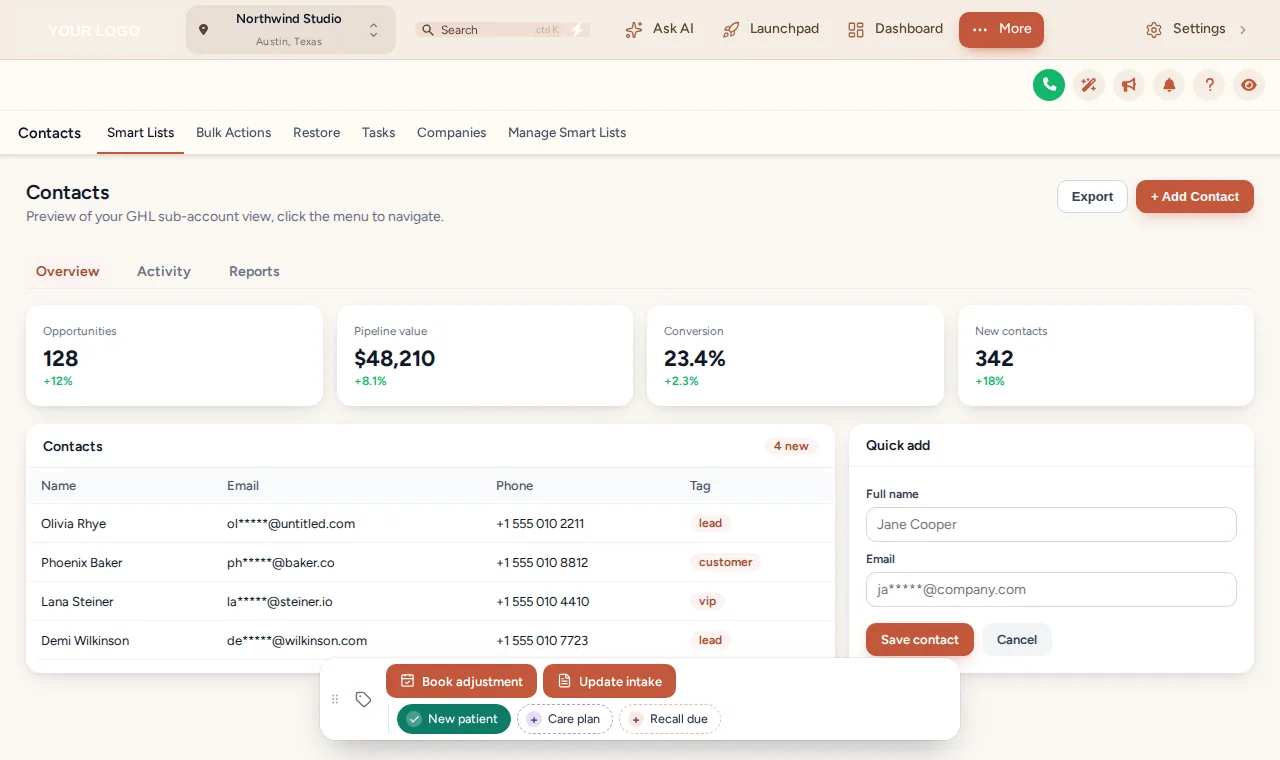
One tap tags a new patient, starts a recall or opens a short intake update. The bar sits on every GoHighLevel contact page and talks to the workflows you already have.
Tap a chip: it toggles the tag on this sample contact.
GHL contact quick actions put one-tap tags and buttons on every contact page. A chip adds or removes a tag, which can start a GoHighLevel workflow; a button can change tags or open a short form that writes to custom fields. The page updates at once, with optional notes recording each change.
One-tap chips for the tags the front desk uses most. Each chip shows whether the contact already has the tag, and a second tap removes it.
A button can add, remove or toggle tags, so one press starts the workflow that listens for that tag, such as a recall sequence.
A button can open a small form (text, number, date, drop-down, email, phone or link), each field mapped to a custom field on the contact.
Set the confirmation shown when a tag is added or removed and a success message for every button.
Optionally add a note to the contact with what changed and who changed it.
6 starting positions; each person can drag the bar, it remembers the spot, and a double-click on the grip resets it.
The real bar on a sample contact page, set up with clinic tags. Tap New patient, Care plan or Recall due, open Update intake, or drag the bar by its grip.
Loading the live preview
One colour per tagThis is the real bar on a sample contact page. Tap a quick tag, open Update intake, or drag the bar by its grip. Nothing is saved here; inside GoHighLevel the contact updates at once.
Pairs with the review and recall workflows in the Chiropractor Snapshot, or with any workflow you already run.
In the contact actions tab, add the quick tags and buttons your team needs, with colours, icons and messages.
Use the tags your GoHighLevel workflows already listen for, or the custom fields a form should fill.
Show a chip or button in every sub-account, or only in the clinics you list.
The bar appears on every contact page in those sub-accounts on the next page load.
A bar on the GoHighLevel contact page with one-tap tag chips and buttons. A chip adds or removes a tag; a button can change tags or open a short form that writes to custom fields. It turns routine front desk jobs into one tap.
Your workflow listens for a tag, for example "recall due". Tapping that chip adds the tag, and GoHighLevel starts the workflow as if the tag had been added by hand.
Text, paragraph, number, date, drop-down, email, phone and link, each mapped to a custom field on the contact.
No. The preview runs the real bar on a sample page and sends nothing. Inside GoHighLevel the same taps update the contact straight away.
Yes. Each chip or button can show in every sub-account or only in the ones you list, which suits an agency running several clinics.
The chip flips back and shows why, so the screen never claims a tag was added when it was not.
Yes. Optionally add a note to the contact each time: which tag was added or removed and by whom, or which field changed.
Tags and fields stay inside your GoHighLevel account as before; the bar only makes them faster to set. Keep tag names neutral (for example "recall due" rather than a diagnosis).
Adjustment Plus ($467 once) and above, together with menus, dashboards and pipeline boards.
Contact actions, menus, dashboards and pipeline boards come with Adjustment Plus for $467 once.
GHL Chiropractor Snapshot is an independent business. GoHighLevel and HighLevel are trademarks of their owner; we are not affiliated with or endorsed by HighLevel. GHL Customizer accounts run on the GHL Customer Care customizer platform. Screens on this page are our own captures of sample data, not real patient or client records.
Manage how we use cookies. Necessary cookies keep the site working and can't be turned off.
Saved on this device. Press Esc to close.