
Savings and comparison
- Stack replacement table (13)
- Savings calculator (9)
- Us vs them (7)

T4 Calculator widgets
People trust a number they worked out themselves. Embed a no-show cost calculator on the clinic site, or a marketing ROI calculator on your agency site, in your words and colours.
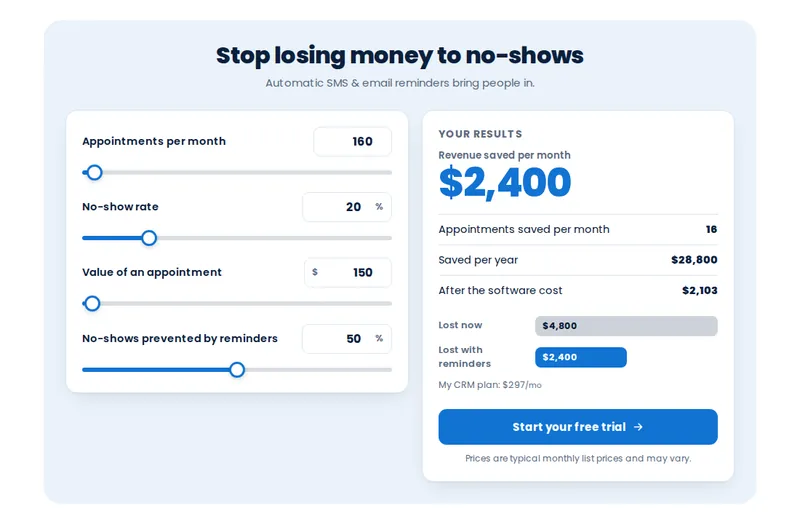
The calculator widgets are 134 embeddable templates across 14 types that turn a sales claim into the visitor's own number. They cover savings, ROI, add-on value and price building, with 13 style presets, lead capture and PNG export. Up to 10 can be live at once on Wellness Spine.
It opens on the email and SMS marketing ROI calculator. Drag the sliders, then switch type, template, style preset and backdrop.
Loading the live preview
SplitLive calculators running the customizer engine. Drag the sliders or type numbers; the results recalculate as you go.
Appointments per month, no-show rate and the value of a visit: the result shows what reminders could recover. A useful page for an agency pitching recall automation to a practice.
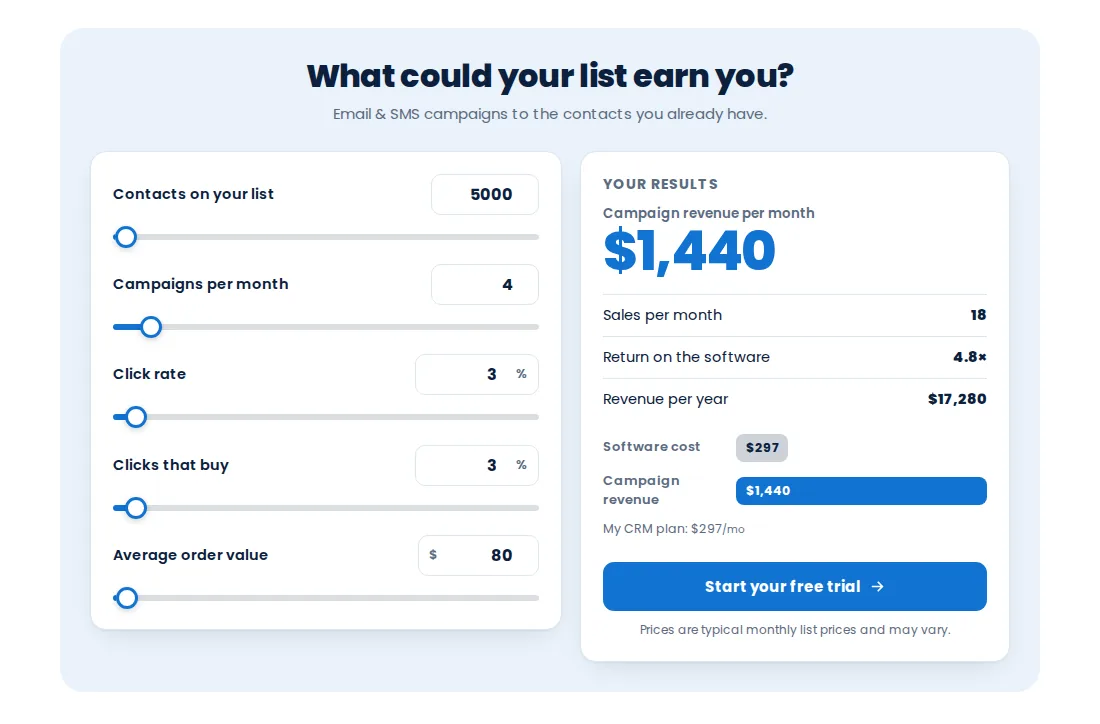
List size, campaigns, click and buy rates: a quick way to show a clinic what a reactivation campaign to past patients could be worth, using their own numbers.
Results are estimates from the visitor's inputs. Keep defaults realistic, label the result as an estimate, and avoid outcome promises in patient-facing copy.
Choose one of 14 calculator types and 134 templates, then one of 13 style presets.
Enter your plans, add-ons and currency once, rename every label in your own words, and set sensible defaults for the sliders.
Paste one line into a website or funnel page, share the hosted page, or export a PNG for a proposal.
Ask for an email to send the result. On Wellness Spine, that lead can go straight into GoHighLevel to start follow-up.
An interactive calculator you embed on a website or funnel: visitors move sliders or type numbers and see a result, such as revenue lost to no-shows or return on email marketing. It turns a claim into the visitor’s own figure.
134 templates across 14 types, with 13 style presets, all in Wellness Spine. Up to 10 can be live at once.
The no-show reducer (what missed visits cost per month), speed to lead and database reactivation are the natural fits for a clinic. Agencies selling to clinics lean on the email and SMS marketing ROI and stack replacement calculators.
The calculator does the arithmetic on the inputs the visitor enters, starting from defaults you set. Choose defaults that are typical for your audience and say so on the page; never present a calculator result as a promise.
Yes. Every label, the currency and your own plan prices are editable, so a calculator can speak about visits and care plans rather than generic leads and deals.
Yes. Capture an email with the result attached; on Wellness Spine the lead can be sent into GoHighLevel.
Any website or funnel page via one embed line, as a hosted page you link to, or as a PNG image in a proposal or slide deck.
Pick one of 13 style presets or keep the template style, and choose a light, dark or transparent backdrop. Try them in the preview above.
Yes. Layouts stack on small screens; the phone button in the preview shows the mobile version.
134 calculator templates, plus popups, notifications and floating widgets, come with Wellness Spine for $917 once.
GHL Chiropractor Snapshot is an independent business. GoHighLevel and HighLevel are trademarks of their owner; we are not affiliated with or endorsed by HighLevel. GHL Customizer accounts run on the GHL Customer Care customizer platform. Screens on this page are our own captures of sample data, not real patient or client records.
Manage how we use cookies. Necessary cookies keep the site working and can't be turned off.
Saved on this device. Press Esc to close.